Key Takeaways
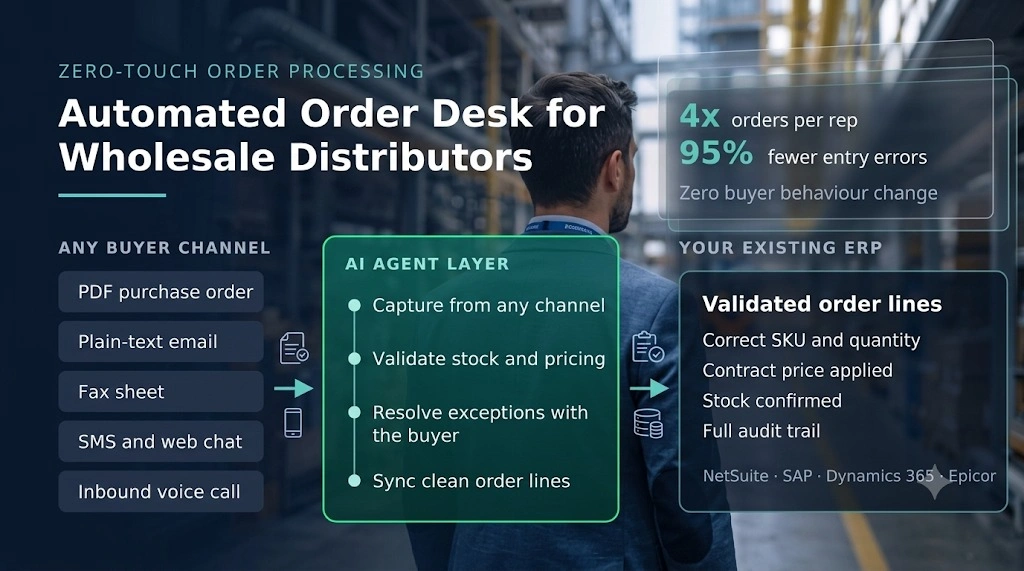
- An automated order desk for wholesale distributors uses AI agents to read incoming orders from PDFs, emails, faxes, SMS and phone calls, validate them against the ERP, resolve exceptions with the buyer, and write clean order lines without a rep keying anything.
- Manual order desks lose margin in three places: rep hours spent keying, entry errors that trigger returns and credits, and peak-hour calls nobody answers.
- B2B portals and OCR tools each solve part of the problem. Portals need buyers to change habits. OCR still hands exceptions back to a human.
- Ordana benchmark figures across deployed distributors: 4x orders per rep, a 95% drop in entry errors, zero unanswered order calls, and go-live in under 24 hours.
- Judge any vendor on exception handling, not extraction accuracy. Extraction is solved. Autonomous exception resolution is where the labour savings actually come from.
An automated order desk for wholesale distributors is the difference between a rep who processes 40 orders a day and a rep who oversees 160. If your order desk still starts each morning with a queue of PDF attachments, faxed sheets, voicemails and text messages that somebody has to retype into NetSuite, SAP, Epicor or Dynamics, you already know the cost. Reps spend the bulk of their shift copying line items. Orders stall the moment a SKU is short or a price does not match the customer’s tier. Calls go unanswered during the 7am spike, and those orders go to whoever picks up the phone first.
This guide covers what an automated order desk for wholesale distributors actually does, where the manual process leaks money, how zero-touch processing works step by step, how the approach compares with B2B portals and OCR tools, and what to check before you sign with any vendor.
Automated Order Desk for Wholesale Distributors: What It Does
An automated order desk for wholesale distributors is an AI agent layer that sits on top of your existing ERP and handles inbound orders end to end, from any channel, with no human keying and no change to how your buyers order.
Here is what that covers in practice:
- Ingests orders in whatever format they arrive: PDF attachments, plain-text email, fax, SMS, web chat and inbound voice calls.
- Maps free-text buyer language to real catalogue SKUs, including customer-specific part numbers and shorthand.
- Checks live stock and contract pricing inside the ERP before the order is committed.
- Contacts the buyer directly to confirm substitutions, quantity changes or price discrepancies.
- Writes structured, validated order lines into the ERP and confirms back to the buyer.
Automated Order Desk vs the Manual Order Desk Most Distributors Run Today
The manual order desk is a human parser. A rep opens an attachment, reads it, decides what each line means, looks up stock, keys it in, and picks up the phone when something is wrong. Every step depends on that rep’s product knowledge and available hours.
The automated order desk keeps the same workflow and removes the typing and the chasing. The rep stops being a data entry operator and becomes an exception supervisor, reviewing the small share of orders the agents flag rather than touching all of them.
Automated Order Desk Channel Coverage: PDF, Email, Fax, SMS and Voice
Channel coverage is the part distributors underestimate. Wholesale buyers, whether c-stores, grocery chains, auto shops or pharmacies, order the way they have always ordered. A working automated order desk has to accept:
- Scanned or native PDF purchase orders with inconsistent table layouts
- Email bodies with no structure at all, such as “send 5 cases gatorade blue”
- Inbound faxes, still standard in food service and pharma supply
- SMS and web chat threads
- Voice calls, including the ones that arrive during the morning peak
Automated Order Desk Output: Clean, Validated ERP Lines
The output standard is the same as your best rep on their best day. Correct SKU, correct quantity, correct unit of measure, correct contract price, correct ship date, posted directly into the ERP. If any of those cannot be confirmed, the order should not post silently with a guess. It should trigger a buyer conversation and then post.
Automated Order Desk Business Case: What the Manual Process Costs
Order desk automation is not a productivity nice-to-have for mid-market distributors. Three specific leaks fund the entire project.
Where the money goes:
- Labour: rep hours consumed by keying rather than selling or servicing accounts
- Margin: entry errors that turn into return freight, restock fees and discounted replacements
- Revenue: peak-hour calls that ring out and orders that never get placed
Order Desk Reps Spend Most of Their Day Keying Line Items
VPs of Operations at mid-market distributors consistently report that reps spend around 70% of their morning copying line items from messy documents into the ERP (Ordana customer discovery). That is the single largest addressable block of order desk cost, and it scales linearly with volume. Win a large new account and you hire, or you pay overtime.
Order Entry Errors Cost 2% to 4% of Margin
Manual keying error rates in wholesale order entry typically sit between 2% and 5% of lines, and the downstream cost of those errors runs 2% to 4% in margin loss once return shipping, restock fees and discounted replacement goods are counted (Ordana benchmark data). Worse, the same errors drive churn. A buyer who receives the wrong case count twice starts pricing alternatives.
Peak-Hour Call Loss Sends Orders to Competitors
Distributors commonly lose 10% to 15% of calls during peak windows (Ordana benchmark data). Nobody logs those as lost revenue because nobody knows what was in them. An automated order desk for wholesale distributors answers every call, takes the order against live catalogue and pricing tiers, and escalates only what it cannot resolve.
Automated Order Desk vs the Portal-or-Headcount Tradeoff
The market presents two options: push buyers onto a B2B e-commerce portal, or add headcount. Portals fail because buyers will not log into a website when they can send the same order by email in nine seconds. Headcount works, but it caps your growth at your recruiting rate and your training capacity. Zero-touch processing removes the tradeoff by automating the desk instead of relocating the work onto the buyer.
Automated Order Desk Processing: How Zero-Touch Works, Step by Step
Zero-touch processing runs in four stages. Every vendor claim you evaluate should map to one of them.
The four stages:
- Capture from any channel
- Validate against ERP stock and pricing
- Resolve exceptions with the buyer autonomously
- Sync clean lines and confirm
Stage 1: Automated Order Desk Capture From Any Inbound Channel
Agents monitor the shared order inbox, the fax line, the SMS number, the chat widget and the order phone line. Documents are parsed without per-vendor template setup, which matters because most distributors receive orders in hundreds of different layouts and cannot maintain a template library for each one.
Stage 2: Automated Order Desk Validation Against ERP Stock and Pricing
Extracted lines are matched to catalogue SKUs, then checked live against inventory and the customer’s contract pricing matrix. This is where a real automated order desk separates from a document scanner. Extraction without validation just moves the error further down the line.
Stage 3: Automated Order Desk Exception Resolution Without a Rep
When a SKU is short, discontinued or priced differently from the PO, the agent contacts the buyer on the channel they used, by email, SMS or outbound call, proposes a substitution or confirms the price, and closes the loop. No rep queue, no held order, no next-day callback.
Stage 4: Automated Order Desk Sync and Buyer Confirmation
Validated lines post into the ERP as structured records with a full audit trail, and the buyer receives a confirmation. The rep sees only the exceptions the agents could not close.
Would your team rather review 200 exceptions a week or key 4,000 line items? Distributors running Ordana process 4x more orders per rep with a 95% reduction in entry errors, without asking a single buyer to change how they order.
Automated Order Desk vs B2B Portals vs OCR Tools
| Dimension | B2B e-commerce portal | Legacy OCR / IDP | Automated order desk (AI agents) |
|---|---|---|---|
| Buyer adoption friction | High: buyers must learn and log into a portal | None: back-office tool only | None: buyers keep using email, PDF, fax, text, phone |
| Channel coverage | Portal only | Documents only | PDF, email, fax, SMS, chat, voice |
| Exception resolution | Manual: buyer or rep fixes it | Manual: flags errors for a human | Autonomous: agent contacts buyer to confirm sub or price |
| Setup and integration | 3 to 6 months implementation | Template setup per vendor layout | Under 24 hours via pre-built ERP connectors |
| ERP data quality | Good, if buyers use it | Depends on flagging discipline | Validated against live stock and contract pricing |
| Average order value growth | Passive: depends on buyer browsing | None | Active: agents suggest reorders and add-ons |
Portals and OCR are not wrong, they are partial. A portal solves order capture for the minority of buyers who adopt it. OCR solves extraction and stops at the exception. An automated order desk for wholesale distributors is the only one of the three that removes the human from the whole loop, including the awkward part where somebody has to phone a buyer about a stockout.
Automated Order Desk ROI Benchmarks for Wholesale Distributors
The financial case rests on four numbers, and every one of them should be measured against your own baseline before you buy.
| Metric | Industry baseline | Automated order desk target | Impact area |
|---|---|---|---|
| Orders per rep | Scales with headcount | 4x volume increase | Rep capacity and labour cost |
| Entry error rate | 2% to 5% of manually keyed lines | 95% reduction | Margin protection and retention |
| Peak call loss | 10% to 15% of calls unanswered | Zero unanswered calls | Revenue leakage |
| Time to value | 3 to 6 months for EDI or portal onboarding | Live in under 24 hours | Payback period |
Figures above are Ordana benchmark targets across deployed distributor accounts rather than independent third-party research. Ask any vendor, including Ordana, for named reference accounts at your volume and in your vertical, and validate the numbers against your own order desk before you commit.
For a CFO, the calculation is simple. Take your annual order desk labour cost, add your credits and return freight attributable to entry errors, and compare that with the subscription. Most mid-market distributors processing 500 to 50,000 line items a day reach payback in under three months on labour alone.
Automated Order Desk Evaluation Checklist for Wholesale Distributors
Use these questions on every vendor call. They separate an automated order desk for wholesale distributors from a document parser with good marketing.
What to ask:
- Which channels do you handle natively, including inbound voice and fax?
- What percentage of orders complete with zero human touch, and how is that measured?
- How do you resolve a stockout without a rep, and can you show a recorded example?
- Do you write into our ERP directly, and is the connector pre-built for our version?
- How is our catalogue, pricing matrix and buyer history isolated from other tenants?
- Is our data ever used to train models serving other distributors?
- What does go-live actually require from our IT team?
- How are customer-specific part numbers and unit-of-measure conversions handled?
Automated Order Desk Data Governance Questions Every Buyer Should Ask
Your buyer order histories, pricing matrices and customer lists are trade secrets. Insist on written commitments covering tenant data isolation, no cross-client model training, encryption in transit and at rest, documented audit trails per automated transaction, and permanent deletion of logs and ERP mappings if you terminate.
Automated Order Desk for Wholesale Distributors: How Ordana Delivers It
Ordana is a vertical AI platform built for the wholesale order desk, running on a zero buyer behaviour change principle: your buyers keep ordering exactly as they do today, and the agents absorb the work.
The platform runs four specialised agents on top of your existing ERP.
Ordana Desk: End-to-End Order Parsing and Exception Handling
Ordana Desk parses PDFs, emails and faxes, checks stock inside the ERP, auto-resolves missing SKUs and pricing gaps by contacting the buyer over email or SMS, and syncs the clean order. This is the core of the automated order desk for wholesale distributors: capture, validate, resolve, post.
Ordana Voice: 24/7 Telephony Intake and Outbound Resolution
Ordana Voice is trained on your catalogue and pricing tiers. It answers inbound order calls around the clock, including the morning peak that currently rings out, and places the outbound exception calls when Desk flags a stockout.
Ordana Predict: Cart Pre-Building and Average Order Value Lift
Ordana Predict analyses historic buying frequency and pre-builds the buyer’s cart before they contact the desk, then suggests contextual add-ons. This is the part portals promise and rarely deliver, because it does not depend on the buyer browsing anything.
Ordana Chat: Conversational Ordering Over SMS and Web
Ordana Chat interprets unstructured buyer input such as “send 5 cases gatorade blue” and turns it into an instant quote or order, so text-message ordering becomes a supported channel instead of a rep’s side task.
Ordana Deployment, Security and ERP Fit
Pre-built connectors cover NetSuite, SAP, Microsoft Dynamics 365, Epicor, QuickBooks Enterprise, Produce Pro and Encompass, with go-live measured in hours rather than months. On governance, Ordana commits to per-tenant data isolation, zero cross-client model training, GDPR and SOC 2 aligned controls with TLS 1.3 in transit and AES-256 at rest, audit trails on every automated transaction, and permanent deletion of buyer history, logs and ERP mappings on contract exit.
Ordana fits distributors in food and beverage, CPG and c-store, industrial parts, plumbing and electrical supply, commercial pharma and chemical distribution, typically between $20M and $500M+ in revenue, processing 500 to 50,000+ line items a day.
Automated Order Desk Next Steps for Wholesale Distributors
Start by measuring three things this week: the share of rep time spent on keying, the credits and return freight tied to entry errors over the last quarter, and your unanswered call rate during peak hours. Those three numbers are your business case, and they are also the benchmark you will hold any vendor to after go-live.
Frequently Asked Questions (FAQ’s)
What is an automated order desk for wholesale distributors?
It is an AI agent layer over your existing ERP that receives inbound orders from any channel, validates them against live stock and contract pricing, resolves exceptions with the buyer directly, and posts clean structured lines without a rep keying anything.
Do our buyers have to change how they place orders?
No. That is the point of the approach. Buyers keep sending PDFs, emails, faxes and texts, or keep calling. The agents adapt to the buyer’s channel rather than asking the buyer to adopt a portal.
How is this different from OCR or intelligent document processing?
OCR extracts text and flags what it cannot read for a human to fix. An automated order desk validates the extracted lines against ERP stock and pricing, then contacts the buyer itself to resolve stockouts, substitutions and price mismatches before posting.
Which ERPs does an automated order desk integrate with?
Pre-built connectors typically cover NetSuite, SAP, Microsoft Dynamics 365, Epicor, QuickBooks Enterprise and distribution-specific systems such as Produce Pro and Encompass. Confirm your exact version and any customisations during evaluation.
How long does implementation take?
Portal and EDI programmes usually run 3 to 6 months. An agent-based automated order desk connects through existing channels and pre-built ERP connectors, with go-live in under 24 hours in Ordana deployments. Validate that timeline against reference accounts at your volume.
What happens when a SKU is out of stock?
The agent detects the shortfall during ERP validation, contacts the buyer on their own channel with a substitution or revised quantity, confirms the change, and posts the corrected order. The rep is involved only if the buyer does not respond or the exception falls outside configured rules.
Does an automated order desk replace order desk reps?
It changes what they do. Keying and chasing move to the agents, and reps move to exception supervision, account servicing and the complex orders that need human judgement. Most distributors redeploy capacity rather than reduce headcount, because the same team can absorb volume growth without overtime.
How do we protect our pricing and customer data?
Require per-tenant isolation, a written guarantee that your catalogue and pricing data will never train models for other distributors, encryption in transit and at rest, transaction-level audit logs, and permanent data deletion on exit.
← Back to all blogs