Key takeaways
- OCR order processing reads text on a page; AI order processing understands what that text means in context.
- OCR still needs a human to catch mismatched SKUs, missing fields, and formatting errors – AI order processing is built to catch and resolve those on its own.
- The real cost difference isn’t the software fee, it’s the labor hours spent on manual exception handling every month.
- Distributors running high order volumes with inconsistent PO formats see the biggest gap between the two.
AI order processing vs. OCR is the decision most wholesale distributors are quietly running into in 2026, usually after another season of order spikes stretches their operations team too thin. Both technologies promise to take manual data entry off your team’s plate. Only one of them actually understands the order it just read.
This guide breaks down how each approach works, where OCR order processing tends to fall short, and what changes when a distributor moves to AI order processing instead.
OCR Order Processing: How Legacy Systems Handle Purchase Orders
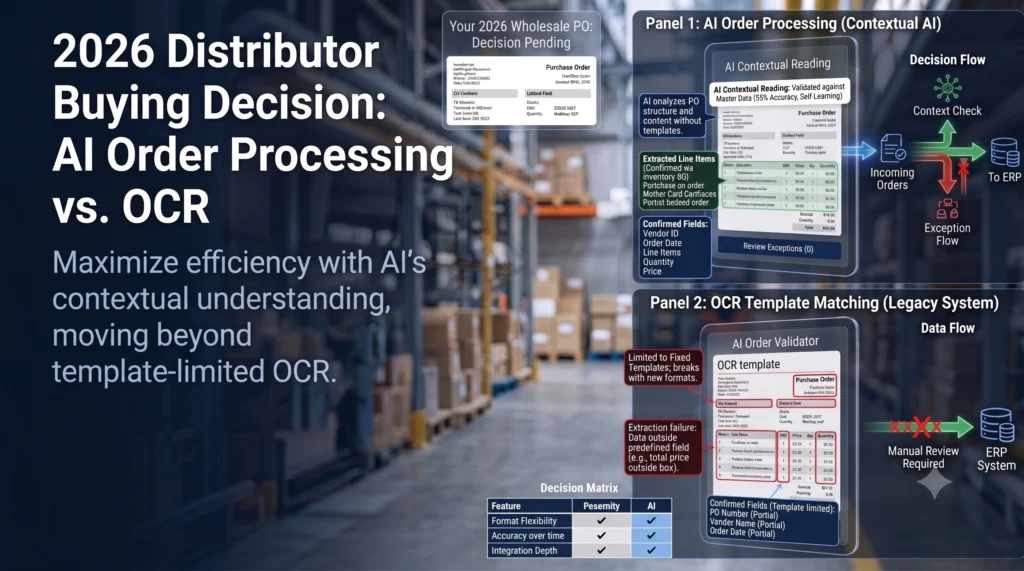
OCR order processing scans a document, matches character shapes to a template, and pulls out text into fields you’ve predefined. It works well when every order arrives in the same format. It works poorly the moment a customer sends something different.
- Matches text to a fixed template or field map
- Flags anything outside the expected layout for manual review
- Needs a person to re-key or correct a large share of orders
How OCR Order Processing Works
Most OCR order processing tools are trained on a specific document layout – a particular customer’s PO template, for example. The software scans the page, looks for text in the positions it expects (order number here, ship-to address there), and extracts it. When the layout matches, it’s fast. When it doesn’t, accuracy drops sharply.
Where OCR Order Processing Breaks Down
The workaround most distributors use today is a manual review queue: someone on the ops team checks every OCR-flagged order, corrects misreads, and manually matches line items to SKUs in the ERP. It works, but it doesn’t scale. As order volume grows, so does the backlog of exceptions waiting on a person.
Common OCR Order Processing Error Types
- Misreads on handwritten notes, faxes, or low-quality scans
- Field mismatches when a customer’s PO layout changes without notice
- Line items that don’t map cleanly to your SKU catalog
- Split or combined fields (e.g., quantity and unit merged into one string)
AI Order Processing: How It Differs From OCR
AI order processing doesn’t rely on a fixed template. It’s built to read the order the way a person would – pulling meaning from context rather than position on the page – which is what lets it handle purchase orders that don’t follow a set layout.
- Reads unstructured or inconsistent order formats without a template
- Matches line items to your SKU catalog using context, not just text matching
- Routes genuine exceptions to a person instead of flagging everything
How AI Order Processing Reads Unstructured Orders
Instead of looking for text in a fixed position, AI order processing interprets the document as a whole: it identifies what’s a quantity, what’s a SKU reference, and what’s a shipping instruction based on meaning, not layout. That’s what lets it handle a PO from a new customer on day one, without a template being built first.
AI Order Processing and Exception Handling
The exceptions that reach a human are narrower and more meaningful — a genuinely ambiguous line item, not a formatting quirk. For a distribution ops team, that’s the difference between reviewing 40% of incoming orders and reviewing 5%.
AI Order Processing vs. OCR: Side-by-Side Comparison
| OCR Order Processing | AI Order Processing | |
| Accuracy on standard layouts | High | High |
| Accuracy on varied/unstructured orders | Low – drops sharply outside the trained template | Consistently higher across formats |
| Setup | Requires a template built per customer/layout | Works with minimal per-customer setup |
| Manual review volume | High – most exceptions need a person | Lower – only genuine ambiguities are flagged |
| Cost driver | Software fee is low, but labor hours on exceptions add up | Higher software cost, offset by far fewer labor hours |
| Scalability with order growth | Manual review queue grows with volume | Built to absorb volume increases without adding headcount |
Accuracy: AI Order Processing vs. OCR
OCR order processing is accurate within its trained template and unreliable outside it. AI order processing holds up across a wider range of formats because it isn’t matching against a fixed layout in the first place.
Cost: AI Order Processing vs. OCR
OCR software itself is often the cheaper line item. But factor in the hours a team spends correcting misreads and manually matching line items, and the total cost tends to run higher than a distributor expects. AI order processing usually costs more upfront and less over a full order cycle.
Scalability for High-Volume Wholesale Orders
This is where the gap is widest. A distributor processing a few hundred POs a month can absorb OCR’s manual review load. A distributor processing several thousand — especially during seasonal spikes — often finds that review queue becomes the bottleneck for the whole fulfillment process.
Why Wholesale Distributors Are Switching to AI Order Processing for 2026
The teams making this switch usually aren’t chasing new technology for its own sake. They’re responding to a specific, recurring problem: order volume growing faster than their ops headcount.
Pain Points Legacy OCR Doesn’t Solve
- Ops teams stuck manually re-keying orders that OCR couldn’t read cleanly
- SKU mismatches that slip through and cause fulfillment errors
- Exception queues that spike during peak season and don’t shrink after
- New customers or vendors whose PO format doesn’t match any existing template
What to Look for When Evaluating an AI Order Processing Vendor
- Can it read your actual order formats, not just a demo document?
- How does it integrate with your existing ERP and EDI setup?
- What does the exception-review workflow look like when it’s uncertain?
- Can you see accuracy and exception-rate reporting, not just a black-box output?
Frequently Asked Questions (FAQ’s)
What is AI order processing?
AI order processing is software that reads incoming purchase orders and extracts the relevant information – SKUs, quantities, shipping details — by interpreting the document’s context rather than matching it to a fixed template.
How does AI order processing differ from OCR?
OCR order processing matches text to a predefined template and struggles with anything outside it. AI order processing interprets the order’s meaning, so it handles varied and unstructured formats with fewer manual corrections.
Is OCR order processing accurate enough for wholesale distributors?
It can be, if your order formats are consistent and standardized. Distributors who receive POs in many different formats tend to see OCR’s accuracy drop and their manual review workload rise.
What does AI order processing cost compared to OCR?
AI order processing typically has a higher software cost but lowers the labor hours spent on manual exception handling, which often makes the total cost lower over time — particularly at higher order volumes.
Can AI order processing integrate with existing ERP and EDI systems?
Most AI order processing platforms are built to integrate with common ERP and EDI systems, though the depth of integration varies by vendor — this is worth confirming directly during evaluation.
How long does it take to implement AI order processing?
Implementation timelines vary by vendor and the complexity of your existing systems, but AI order processing generally requires less per-customer template setup than OCR, which can shorten time to first use.
← Back to all blogs