Key Takeaways
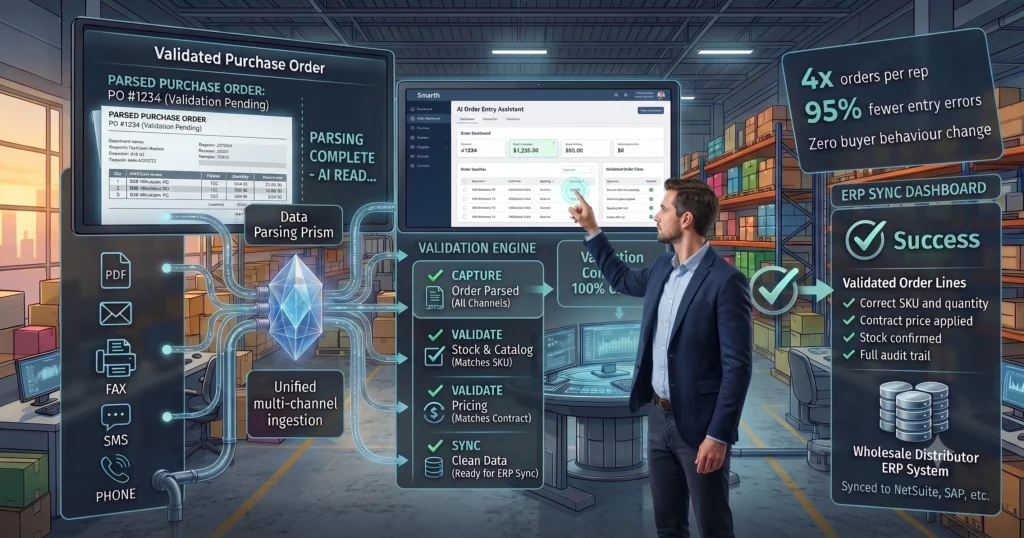
- An AI order entry assistant reads purchase orders from email, PDF, fax, EDI, and phone, then pushes validated records into your ERP, cutting manual keying almost entirely.
- Distributors running this kind of order entry automation report handling far higher order volume with the same headcount, because the software does the data entry work a person used to do line by line.
- Unlike OCR-only tools, it understands context: it matches SKUs against your catalog, checks stock, and flags exceptions instead of just scanning text.
- Rollout does not require replacing your ERP or your order desk team; the assistant sits in front of existing workflows and hands off exceptions to a person.
What Is an AI Order Entry Assistant for B2B Distributors?
An AI order entry assistant is software built for B2B wholesale distributors that reads incoming purchase orders (email, PDF attachment, fax, EDI, or a phone call) and enters that order into your ERP without a person retyping it line by line.
Traditional order entry means someone on your order desk opens each PO, reads the line items, matches them to your product catalog, and keys them into your ERP one field at a time. An AI order entry assistant automates that sequence: it extracts the order data, matches it against your SKU catalog and current inventory, and syncs a validated order into your ERP, only pulling in a person when something does not match.
- Reads orders from multiple channels: email, PDF, fax, EDI, and phone
- Matches line items to your product catalog and current stock
- Pushes validated orders directly into your ERP
- Flags exceptions (price mismatches, out-of-stock items, unclear line items) for a person to review
The Real Cost of Manual Order Entry in Wholesale Distribution
The Current Way: Retyping Every PO by Hand
Most distributors still process purchase orders the same way they did a decade ago. A buyer emails a PDF, faxes a scanned order form, or calls in a list of SKUs, and someone on the order desk opens it, cross-checks it against the catalog, and types it into the ERP line by line.
The Forced Tradeoff: Hire More People or Let Orders Back Up
As order volume grows, teams get stuck choosing between two bad options. Either hire and train more order entry staff to keep pace (adding payroll cost that does not scale down when volume dips), or accept that orders sit in a queue longer during busy weeks, pushing ship dates back and frustrating customers who expected same-day processing.
The Negative Consequences: Errors, Delays, and Burnout
Manual keying is where wholesale order errors start. A transposed digit on a quantity field, a SKU typed from memory instead of looked up, a line item missed on a long PDF: each one turns into a pick error, a return, a credit memo, or an angry call from a customer who received the wrong product. Order desk staff working through peak season backlogs also burn out fast, and turnover on that team means retraining someone new on your catalog and process all over again.
How This Kind of Order Entry Automation Actually Works
Capturing Orders From Any Channel
The software does not care whether a PO arrives as a PDF attachment, a scanned fax, plain email text, or an EDI file. It reads the document, pulls out buyer information, line items, quantities, and requested ship dates, and structures that data the same way regardless of the source format. For teams still fielding orders by phone, Agent Voice captures spoken orders the same way, turning a phone call into a structured order record without anyone typing while they talk.
Validating and Matching Orders to Your Catalog
This is where an AI order entry assistant earns its keep over a plain OCR tool. Instead of just extracting text, it matches every line item against your live product catalog, confirms pricing, and checks current inventory before the order ever reaches your ERP. Agent Predict uses that same matching logic to flag likely reorders and stock-out risk before a customer even places the order.
Handling Orders That Come In Through Chat
Some buyers prefer messaging a rep directly rather than emailing a PDF. Agent Chat captures those conversational orders and runs them through the same validation and ERP sync as any other channel, so a chat-based order gets the same accuracy check as a formal PO.
Syncing Clean Orders Straight Into Your ERP
Once an order is captured and validated, the assistant writes it directly into your ERP: no re-keying, no spreadsheet handoff. Agent Desk is the workspace where your order desk team reviews the small percentage of orders flagged as exceptions, so people spend their time on judgment calls instead of data entry.
AI Order Entry Assistant vs. OCR vs. Manual Entry
| AI Order Entry Assistant | OCR-Only Tool | Manual Entry | |
|---|---|---|---|
| Reads PDF, email, fax, EDI | Yes | Yes (text extraction only) | N/A (person reads it) |
| Handles phone and chat orders | Yes | No | Yes (person takes the call) |
| Matches line items to live catalog | Yes | No | Depends on the person’s memory |
| Checks stock before order hits ERP | Yes | No | Only if the person checks manually |
| Flags exceptions for human review | Yes | No (just outputs raw text) | N/A (person catches or misses it) |
| Syncs directly to ERP | Yes | Usually requires manual review first | N/A (person keys it in) |
| Scales during peak season | Yes, without adding staff | Partially, still needs manual review | No, requires more headcount |
A plain OCR tool tells you what a document says. An AI order entry assistant tells you whether the order is correct and ready for your ERP.
For a deeper breakdown, see AI order processing vs. OCR.
What Distributors Gain From an AI Order Entry Assistant
The clearest gain is throughput: with manual keying removed from the process, order desk teams can process far more orders in the same shift. A specific multiplier like “4x” needs to be checked against your own before-and-after order volume data before it goes live; treat it as an illustrative figure until it is backed by real client numbers, in line with the usual process for this content.
Beyond raw volume, distributors typically see:
- Fewer pick and ship errors, because line items are matched to catalog and stock before the order reaches the warehouse
- Faster order-to-ship time, since orders skip the manual entry queue entirely
- Lower overtime and temp staffing costs during peak season, because the software absorbs the volume spike instead of your team
- Less turnover-driven retraining, since the software, not a new hire, is doing the repetitive matching work
How Ordana Helps: AI Order Entry That Fits Your Existing ERP Workflow
Ordana’s suite of agents, Agent Desk, Agent Voice, Agent Predict, and Agent Chat, is built specifically for the order entry problem wholesale distributors face: PDF, email, fax, phone, and chat orders that all need to end up as clean, validated records in your ERP.
If you are moving off manual PDF handling specifically, automated PDF order capture built for ERP workflows walks through that transition in more depth. Teams that have already put this in place often started with the same problem: reducing manual order entry errors in wholesale is usually the first measurable win before throughput gains show up.
Getting Started Without Disrupting Your Order Desk
Rolling one of these tools out does not mean replacing your ERP or your team. It sits in front of your existing order intake channels and your ERP, so it can go live alongside how your order desk already works.
A typical rollout:
- Connect the tool to your current order channels (email inbox, fax line, EDI feed, phone)
- Run it alongside your existing manual process for a short pilot window so your team can compare outputs
- Start routing exceptions, not every order, to your order desk team for review
- Expand to full order volume once accuracy is validated against your own data
If you are researching how AI order desk tools connect to specific ERP systems, AI agent order desk integration covers the integration side in more detail, and order processing software for distributors is a useful next read if you are still comparing platforms broadly. For a wider view of how this fits your operations, see what an order management system does for wholesale distributors.
Ready to see it on your own order volume? Explore Ordana’s order entry agents.
Frequently Asked Questions (FAQ’s)
What is an AI order entry assistant?
An AI order entry assistant is software that reads incoming purchase orders from email, PDF, fax, EDI, or phone, matches the line items against your product catalog and inventory, and enters the validated order into your ERP without manual keying.
How is an AI order entry assistant different from OCR software?
OCR extracts text from a document. An AI order entry assistant goes further by matching that text to your live catalog, checking pricing and stock, and flagging exceptions, then syncing the validated order into your ERP. See AI order processing vs. OCR for a full comparison.
Will it replace my order desk team?
No. It removes the manual keying work and hands your team the smaller set of orders that need a judgment call, such as a price mismatch or an unclear line item.
Does it work with our existing ERP?
Most tools in this category, including Ordana’s, are built to sync with existing ERP systems rather than requiring a new one. AI agent order desk integration covers how that connection typically works.
Can it handle orders that come in by phone or chat, not just PDF?
Yes. Agent Voice captures phone orders and Agent Chat captures chat-based orders, running both through the same validation as PDF or email orders.
← Back to all blogs