Key takeaways
- B2B order desk labor cost reduction comes from removing manual keying, exception chasing, and rework, not from pushing reps to type faster.
- APQC benchmarks put manual order processing at $10 to $16.50 per order, against a $4 median for orders received through electronic channels.
- Around 70% of B2B sales orders were still processed manually in early 2025, according to Conexiom.
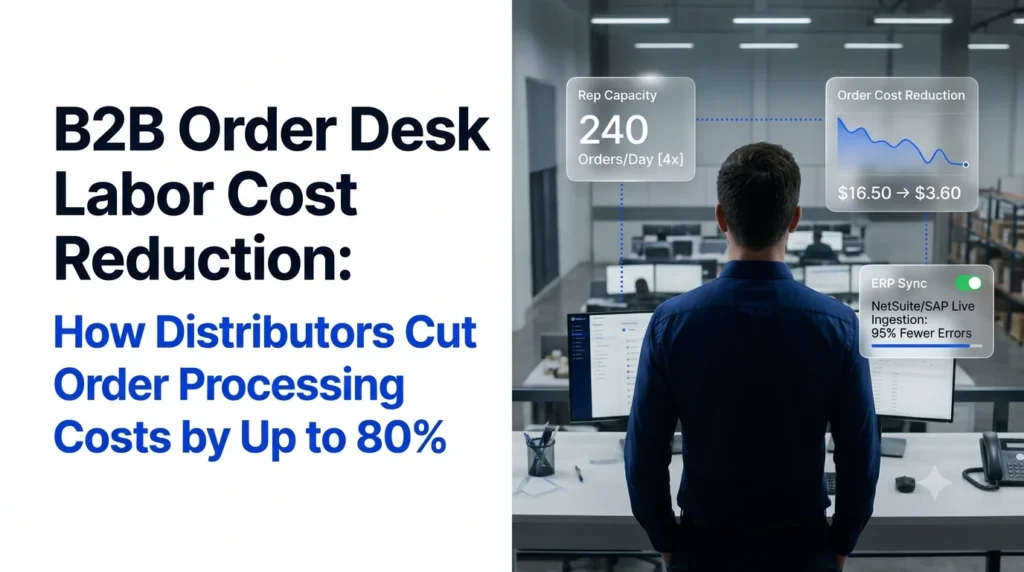
- AI order agents let one rep handle up to 4x more orders, which cuts labor cost per order by 75% before you count any savings from fewer errors.
- Ordana gets there without asking buyers to change how they order: PDF, email, fax, text, and phone orders all flow straight into the ERP.
B2B order desk labor cost reduction is one of the fastest margin levers a wholesale distributor can pull, because most order desks still spend the bulk of their day copying line items from emails, PDFs, and faxes into the ERP.
In plain terms, B2B order desk labor cost reduction means lowering the people-hours, overtime, and rework spend needed to turn an incoming customer order into a clean, validated sales order in your ERP. It is not about cutting service. It is about taking repetitive keying off your reps so the same team can handle far more volume.
This guide shows where order desk labor money goes, compares the main options for cutting it, walks through the math behind an up to 80% reduction, and explains how Ordana’s AI order desk platform gets you there.
B2B Order Desk Labor Cost Reduction Starts With Your Real Cost per Order
You cannot cut what you have not measured, and most distributors underestimate what a manual order costs.
- Manual orders cost several times more than electronic ones.
- Labor sits in five places, not just keying.
- A simple formula gives you a baseline in an afternoon.
According to APQC data reported by Modern Distribution Management, manually processing a customer order costs a company between $10 and $16.50. APQC’s cross-industry benchmark of 763 organizations puts the median cost of a sales order received through electronic channels at $4.00, as summarized by Elogic Commerce. That gap is the size of the prize.
The gap also applies to most of the order book. Conexiom data cited by Workd shows about 70% of B2B sales orders were still processed manually as of early 2025.
Where Order Desk Labor Hours Actually Go
- Keying: reading each order and typing header and line items into the ERP.
- Validation: checking SKUs, units of measure, pricing tiers, and stock.
- Exception chasing: calling or emailing buyers about substitutions, missing SKUs, or price mismatches.
- Phone intake: taking orders live, usually during a narrow morning window.
- Rework: fixing wrong picks, credits, and returns caused by entry mistakes.
Ordana’s work with distribution operations leaders found that order desk reps spend around 70% of their day keying line items into the ERP. For a fuller breakdown of that hidden spend, see our guide to the true cost of manual data entry.
Order Desk Cost per Order: A Quick Baseline Formula
Use this to size your own opportunity:
Cost per order formula
- Cost per order = (fully loaded hourly rep cost x minutes per order / 60) + (error rate x average rework cost per error)
- Multiply the result by annual order volume to get your total order desk labor spend.
That annual figure is the starting point for any business case. Every option in the rest of this guide should be judged by how far it moves it.
Order Desk Labor Costs Stay High Because Manual Entry Does Not Scale
Manual desks force a choice between hiring, overtime, and slower service.
- Headcount grows in a straight line with order volume.
- Morning spikes push work into overtime and missed calls.
- Entry errors create a second, hidden labor bill.
Order Desk Headcount Grows in a Straight Line With Volume
In a manual desk, every new account adds keying hours. Grow orders by 30% and you need roughly 30% more rep hours. A manual sales order processing system has no other way to absorb growth, so revenue gains get eaten by payroll.
Order Desk Peaks Turn Into Overtime and Lost Calls
Most orders land in a short morning window. Reps either work overtime or let calls roll to voicemail. Ordana’s benchmark data puts lost peak-hour calls at 10% to 15% for desks that rely on live phone intake, and every missed call is a missed order.
Order Entry Errors Create a Second Labor Bill
Ordana’s data puts manual keying error rates at 2% to 5%. Each error pulls customer service, the warehouse, and accounts receivable into the fix. That rework is part of the labor equation, which is why teams that reduce manual order entry errors usually see labor savings follow. For the wider set of issues, see these order management challenges in wholesale.
Every minute a rep spends retyping an order that already exists in an email is a minute you pay for twice: once to key it, and again if it is keyed wrong.
B2B Order Desk Labor Cost Reduction Options Compared
Four common approaches cut order desk labor, but only one removes keying without asking buyers to change.
- Hiring adds cost rather than removing it.
- Portals and EDI depend on buyer adoption.
- OCR and IDP tools still leave exceptions to people.
- AI agents handle intake, validation, and exceptions end to end.
| Approach | Buyer behavior change | Who handles exceptions | Typical setup | Effect on order desk labor |
|---|---|---|---|---|
| Hire more reps | None | Reps | Weeks of hiring and training | Cost rises in line with volume |
| B2B e-commerce portal | High: buyers must log in and order online | Buyers or reps | 3 to 6 months | Cuts labor only for orders that move online |
| EDI | High for each trading partner | Reps | 3 to 6 months of onboarding | Strong for large partners, little help for the long tail |
| OCR or IDP tools | None | Reps review flagged fields | Template setup per vendor format | Speeds keying, leaves validation and follow-up manual |
| AI order agents (Ordana) | None: buyers keep using email, PDF, fax, text, phone | AI contacts the buyer to confirm substitutions or pricing | Live in under 24 hours via pre-built connectors | Up to 4x orders per rep |
Setup times and the AI agent figures come from Ordana’s benchmark data. The biggest labor difference sits in the exception column. OCR reads the document, but a person still validates and chases every problem. If you are weighing the two, compare AI order processing vs OCR and these alternatives to intelligent document processing for order entry.
Order Processing Cost Reduction of Up to 80%: How AI Agents Get There
Capacity per rep and fewer errors combine to push savings toward 80%.
- 4x orders per rep alone means 75% lower labor cost per order.
- Removing most rework adds several more points.
- Your result depends on your error rate, overtime, and channel mix.
The Order Desk Capacity Math
If one rep can process four times as many orders, the same volume needs a quarter of the rep hours. That is a 75% drop in labor cost per order from capacity alone. The rest of the gain comes from rework that never happens.
Order Desk Labor Cost Model: A Worked Example
The model below uses illustrative assumptions for a mid-market distributor: 600 orders a day, 250 working days, 60 orders per rep per day on a manual desk, $60,000 fully loaded cost per rep, a 3% error rate, and 45 minutes of rework per error.
| Line item | Manual order desk | With AI order agents |
|---|---|---|
| Orders per rep per day | 60 | 240 (4x) |
| Reps needed for 600 orders a day | 10 | 2.5 |
| Annual rep cost | $600,000 | $150,000 |
| Orders with entry errors per year | 4,500 | 225 (95% fewer) |
| Annual rework cost | $97,356 | $4,868 |
| Total annual order desk labor | $697,356 | $154,868 |
| Reduction | 77.8% |
At a 5% error rate the same model reaches about 79%, and removing paid peak-hour overtime pushes it past 80%. Run the numbers with your own baseline before you quote a figure internally.
Most distributors do not lay off the freed capacity. They redeploy it to account growth, so the saving shows up as volume handled per head rather than as a smaller team.
What AI Order Agents Take Off the Desk
- Multi-channel intake: reads PDFs, emails, faxes, texts, and calls without templates. See how automated PDF order capture into your ERP works in practice.
- Validation against the ERP: checks SKUs, units, pricing, and stock before the order lands, using automated order validation.
- Autonomous exception handling: contacts the buyer to confirm a substitution or price, instead of parking the order for a rep.
- Direct ERP write-back: writes clean, structured lines into the system of record. Our guide to ERP order processing covers the mechanics.
- Round-the-clock phone capture: answers peak and after-hours calls so orders are not lost to voicemail.
How Ordana Delivers B2B Order Desk Labor Cost Reduction
Ordana is a multi-agent AI layer that sits on top of your ERP and runs the order desk end to end.
- Four agents cover documents, phone, chat, and reorders.
- Buyers keep ordering the way they do today.
- It goes live in under 24 hours with enterprise data guarantees.
Ordana is built for wholesale distributors in food and beverage, CPG and c-store, industrial parts, plumbing and electrical supply, commercial pharma, and chemical distribution. Its approach is Zero Buyer Behavior Change: instead of forcing buyers onto a portal they will not use, Ordana takes orders from the channels they already use and turns them into clean ERP orders. That is how B2B order desk labor cost reduction happens without any risk to customer relationships.
Ordana’s Four Agents for the Order Desk
- Ordana Desk: parses PDFs, emails, and faxes, checks stock in the ERP, resolves missing SKUs or pricing with the buyer by email or SMS, and syncs the clean order. This removes keying and exception chasing.
- Ordana Voice: an AI voice agent trained on your catalog and price tiers that takes inbound phone orders around the clock and makes outbound calls when Desk flags a stockout. This removes live phone intake and missed peak calls.
- Ordana Chat: lets buyers order by text or web chat in their own words, such as “send 5 cases of the blue sports drink”, and creates an instant quote or order.
- Ordana Predict: studies buying frequency, pre-builds carts before buyers contact the desk, and suggests relevant add-ons to lift average order value.
Order Desk Automation That Works With Your Current ERP
Ordana connects to NetSuite, SAP, Microsoft Dynamics 365, Epicor, QuickBooks Enterprise, Produce Pro, and Encompass through pre-built connectors, and goes live in under 24 hours compared with 3 to 6 months for EDI or portal onboarding. Our guide to integrating an AI agent with your order desk explains the setup.
Order Data Security Built for Distributors
- Order details and pricing matrices are isolated per distributor account.
- Your catalog and pricing data is never used to train models for other distributors.
- Data is encrypted in transit (TLS 1.3) and at rest (AES-256), with an audit trail for every automated transaction.
- If you leave, all buyer history, logs, and ERP mappings are permanently deleted.
Order Desk Results Ordana Targets
| Metric | Manual baseline | Ordana target |
|---|---|---|
| Orders per rep | Grows only with headcount | 4x volume per rep |
| Entry error rate | 2% to 5% | 95% reduction |
| Lost peak-hour calls | 10% to 15% | Zero unanswered calls |
| Time to go live | 3 to 6 months (EDI or portal) | Under 24 hours |
See it on your own orders. Send Ordana one of your messiest sample orders and watch it land in your ERP during a 15-minute live test. Book a live order test with Ordana.
B2B Order Desk Labor Cost Reduction Plan: 5 Steps to Start
Start with one channel, measure the change, and scale what works.
- Set a baseline before changing anything.
- Pilot on your hardest orders, not your easiest.
- Track the same five KPIs every week.
- Baseline your cost per order. Use the formula above with real payroll, timing, and error data from the last 90 days.
- Map every order channel. Count orders by email, PDF, fax, text, phone, portal, and EDI. Unstructured channels are where B2B order desk labor cost reduction pays back fastest.
- Pilot on your messiest orders. Handwritten faxes and multi-page PDFs show what an AI agent can really do. If it handles those, the clean orders are easy.
- Redeploy freed rep hours. Salesforce’s 2025 State of Sales research, as reported by HumCommerce, found B2B reps spend only 28% to 30% of their time selling. Move order desk staff toward account growth and exception oversight.
- Track five KPIs weekly. Orders per rep per day, touchless order rate, entry error rate, cost per order, and missed calls. For the wider rollout, see our guide to order management automation and the full picture of automated order processing.
Frequently Asked Questions (FAQ’s)
What is B2B order desk labor cost reduction?
B2B order desk labor cost reduction is the process of lowering the staff hours, overtime, and rework spend needed to turn incoming customer orders into validated ERP sales orders, usually by automating order intake, validation, and exception handling.
How much does it cost to process a B2B order manually?
APQC data reported by Modern Distribution Management puts manual order processing at $10 to $16.50 per order. APQC’s median for orders received electronically is $4.00, so manual orders cost roughly three to four times more.
Can AI really cut order processing costs by 80%?
It can come close. Handling 4x more orders per rep cuts labor cost per order by 75%, and cutting entry errors by 95% removes most rework. In the worked example above, the total reduction is about 78%, rising past 80% where error rates and overtime are higher.
Do customers need to change how they place orders?
No. Ordana takes orders from the channels buyers already use, including email, PDF, fax, text, and phone, so there is no portal to adopt.
Will AI agents replace my order desk team?
In most distributors, no. AI agents take over keying and routine exceptions, and reps move into account management, upselling, and oversight of the orders that need a human decision.
How long does it take to implement AI order processing?
Ordana goes live in under 24 hours through pre-built ERP connectors. Most teams start with a pilot on one channel and expand once the KPIs move.
← Back to all blogs