Key takeaways
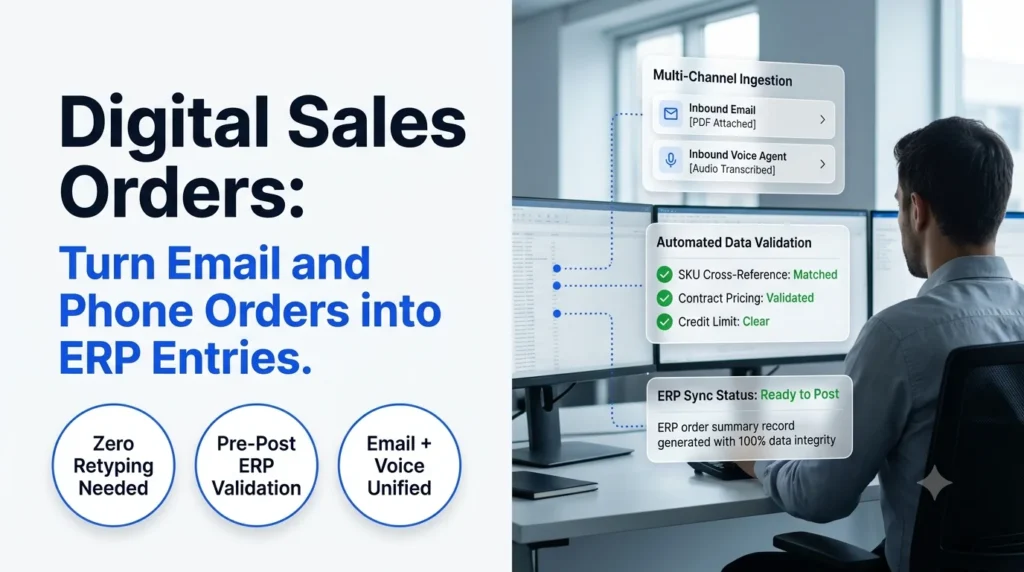
- Digital sales orders are customer orders that arrive by email or phone and land in your ERP as structured records, with no retyping.
- Email and phone are the hardest channels to digitize because the content is unstructured and every customer writes or speaks differently.
- Validating each order against ERP master data before posting is what keeps errors out of fulfillment and invoicing.
- AI agents can read PDFs, spreadsheets, email text and phone calls in one workflow, so your team reviews exceptions instead of keying every line.
- Ordana’s Agent Desk handles email orders and Agent Voice handles phone orders, so both channels feed the same ERP.
Digital sales orders are customer orders that arrive as emails, attachments or phone calls and end up in your ERP as clean, structured records without anyone retyping them. For wholesale distributors, that shift matters because most orders still do not come through a portal or EDI. They come through an inbox and a phone line, and someone on your team turns them into ERP entries by hand.
This guide explains how the process works, why email and phone orders are the hard part, what the workflow looks like from inbox or call to ERP record, and how Ordana fits in. If you are weighing options, the comparison table and rollout plan below will help you decide where to start.
Digital Sales Orders Defined: What Changes When Nobody Retypes the Order
This approach turns any inbound order, in any format, into a structured ERP record.
- Input: an email body, a PDF purchase order, a spreadsheet, a voicemail or a live phone call.
- Output: a validated sales order in your ERP with customer, items, quantities, prices and delivery details filled in.
- Human role: reviewing flagged exceptions instead of keying every line.
Most distributors already offer EDI or a web portal for customers who are willing to change how they order. The problem is the customers who are not. A contractor who has phoned in the same order for ten years will not log into a portal because you asked. Digital order capture meets that customer in the channel they already use and handle the conversion behind the scenes. This is the idea behind sales order automation: the customer’s habit stays the same, and your process changes.
Digital Sales Orders vs Manual Entry: Where Email and Phone Orders Break Down
Manual entry works until volume, staff turnover or order complexity exposes how much depends on individual people.
A typical manual flow looks like this: a rep opens an email, reads the attached purchase order, switches to the ERP, searches for the customer, searches for each SKU, types the quantities and checks the price. A phone order adds a step, because the rep first writes the order down while the customer is talking. Every handoff is a chance for a mistake, and the team that runs this way ends up with a manual sales order processing system built on memory and habit.
Why email orders create hidden rework
Email orders look simple but arrive in many shapes. One customer sends a clean PDF. Another pastes a list into the email body. A third replies to an old thread with a changed quantity buried in the third paragraph. Each format needs a person to interpret it, and small misreads become wrong shipments, credit notes and unhappy customers. The cost of these slips adds up, which is why teams focus on how to reduce manual order entry errors in wholesale.
Why phone orders are the least visible channel
Phone orders leave no document trail. The order exists as handwriting on a pad or a half-remembered conversation until someone keys it in. If the rep is busy, the order waits. If the rep is out, nobody else knows what was agreed. Moving phone orders into digital records gives you a record from the first second of the call.
How Digital Sales Orders Work from Inbox or Call to ERP Record
The workflow has five steps, and each one removes a manual task.
Step 1: Capture the order from the channel
The system watches the order inbox, the shared mailbox or the phone line and picks up each new order as it arrives. Nothing gets forwarded, copied or retyped.
Step 2: Extract and understand the content
The system reads the order and identifies what the customer wants: customer name, ship-to address, product references, quantities, units and requested dates. This step is where basic OCR falls short, because it reads characters but does not understand context. Our guide on AI order processing vs OCR covers the difference in detail.
Step 3: Match to your master data
Customers rarely use your exact item codes. They write their own part numbers, nicknames or old descriptions. The system maps each line to the correct SKU, unit of measure and customer account in your ERP.
Step 4: Validate before anything is posted
The order is checked against pricing agreements, credit status, stock levels and business rules. Anything that does not pass is flagged for a person. Teams that want to go deeper can read about automated order validation for wholesale.
Step 5: Post to the ERP and confirm
Clean orders are written to the ERP as sales orders, and the customer can receive a confirmation. This is the point where ERP order processing takes over, with an order that is already complete and correct.
Digital Sales Orders from Email: PDFs, Spreadsheets and Free-Text Messages
Email is the largest source of unstructured orders for most distributors, so it is the best place to start.
The three common email formats each need different handling:
- PDF purchase orders: layouts vary by customer, with tables, headers and sometimes scanned images. See how automated PDF order capture for ERP removes the keying step.
- Spreadsheets: column names and order differ from one buyer to the next, so the system must map them rather than rely on a fixed template.
- Free-text emails: the order sits inside a sentence, such as “same as last week but double the 12mm fittings.” The system needs to read intent, not just fields.
Ordana’s Agent Desk is built for this channel. It monitors the order inbox, reads each message and attachment, and prepares the order for your ERP.
Digital Sales Orders from Phone Calls: Capturing Voice Orders Without a Keyboard
Phone orders can become structured ERP orders when a voice agent listens, confirms the details and records the order as data.
Many distributors assume phone orders cannot be automated because customers like talking to a person. That is a fair concern, and the goal is not to remove the personal relationship. The goal is to remove the note-taking and re-keying that follows the call. A voice agent can take the order, repeat it back for confirmation and create the ERP entry, and a human can step in when the customer asks for something outside the normal pattern.
Ordana’s Agent Voice handles this channel, so orders that used to live on notepads now arrive in the same queue as email orders.
Digital Sales Orders and ERP Integration: Validation Before Posting
Automation only helps if the ERP receives accurate records, which is why validation sits between capture and posting.
A strong integration checks at least the following before an order is created:
- Customer account: does the sender match an active account and the right ship-to location?
- Product and unit of measure: does each line map to a real SKU in the correct unit?
- Price agreements: does the price match the contract or price list for that customer?
- Credit status: is the account on hold or over its limit?
- Stock and delivery date: can the requested quantity ship on the requested date?
When a check fails, the order goes to a person with the problem highlighted, rather than being posted with an error. If you are planning the technical side, AI agent order desk integration explains how an agent connects to your ERP and order workflow.
How Ordana Helps You Create Digital Sales Orders
Ordana gives wholesale distributors AI agents that turn each inbound channel into structured ERP orders inside the ERP they already use.
- Agent Desk: reads email orders, PDFs and spreadsheets, matches lines to your master data and prepares validated orders for posting.
- Agent Voice: takes phone orders, confirms the details with the caller and records the order without manual note-taking.
- Agent Chat: handles orders and order questions that arrive through chat and messaging.
- Agent Predict: uses order history to anticipate what customers are likely to need next.
The practical result is a single order queue. Whether an order starts as a PDF, an email thread or a phone call, your team sees the same structured record, with exceptions flagged and routine orders ready to post. You keep your ERP and your customers keep their ordering habits. Learn more about the full platform at Ordana.
Digital Sales Orders Comparison: Manual Entry vs Basic OCR vs AI Agents
The table below shows how three approaches to order capture differ on the points that matter most to a distributor.
| Capability | Manual entry | Basic OCR | AI order agents |
|---|---|---|---|
| Handles PDFs | Yes, by hand | Yes, fixed layouts | Yes, varied layouts |
| Handles free-text email | Yes, by hand | No | Yes |
| Handles phone orders | Yes, by hand | No | Yes, with a voice agent |
| Matches customer part numbers to SKUs | By memory | Limited | Yes, using master data |
| Validates against pricing and credit | By the rep | No | Yes, before posting |
| Scales with order volume | Needs more staff | Partly | Yes |
Teams that already use document tools sometimes ask whether they can stretch them to cover orders. The answer depends on how varied your inputs are, and this look at an intelligent document processing alternative for order entry explains where those tools stop.
Digital Sales Orders Rollout: A Five-Step Plan for Wholesale Teams
A phased rollout lets you prove value on one channel before you extend it.
- Map your channels. List where orders arrive today and roughly how many come through each one.
- Pick the first channel. Most teams start with email, because it has the highest volume and the clearest before-and-after.
- Define your validation rules. Write down the pricing, credit and stock checks your team applies by hand today.
- Run in review mode. Let the agent prepare orders while your team approves each one, then relax the review as accuracy is confirmed.
- Add phone and other channels. Once email is stable, bring in voice and chat so every order follows the same path.
As you scale, a clear view of how you manage sales orders across channels helps you decide which exceptions deserve a human and which can post automatically.
Frequently Asked Questions (FAQ’s)
What are digital sales orders?
Digital sales orders are customer orders captured from email, documents or phone calls and entered into the ERP as structured records without manual retyping.
How does automated order capture differ from EDI?
EDI requires the customer to send orders in a fixed electronic format. Automated capture works with the formats customers already send, such as PDFs, spreadsheets, emails and phone calls, and converts them for you.
Can phone orders really become digital sales orders?
Yes. A voice agent can take the order, confirm it with the caller and create the ERP entry. Unusual requests can be passed to a team member.
Will digital sales orders work with my existing ERP?
Most setups connect to the ERP you already run, so you do not need to replace it. The integration approach depends on your system, and a short scoping call will confirm what is supported.
How are errors handled?
Orders are validated against master data, pricing and credit rules before posting. Anything that fails a check is flagged for review rather than entered with a mistake.
Where should a distributor start?
Start with email orders, run the agent in review mode for a few weeks, then extend to phone orders once your team trusts the results.
Start Turning Email and Phone Orders into ERP Entries
If your team still retypes orders from inboxes and phone notes, this approach is the most direct way to give hours back and cut avoidable errors. See how Ordana’s Agent Desk and Agent Voice work together, or explore the wider guide to order management automation to plan your next step.
← Back to all blogs