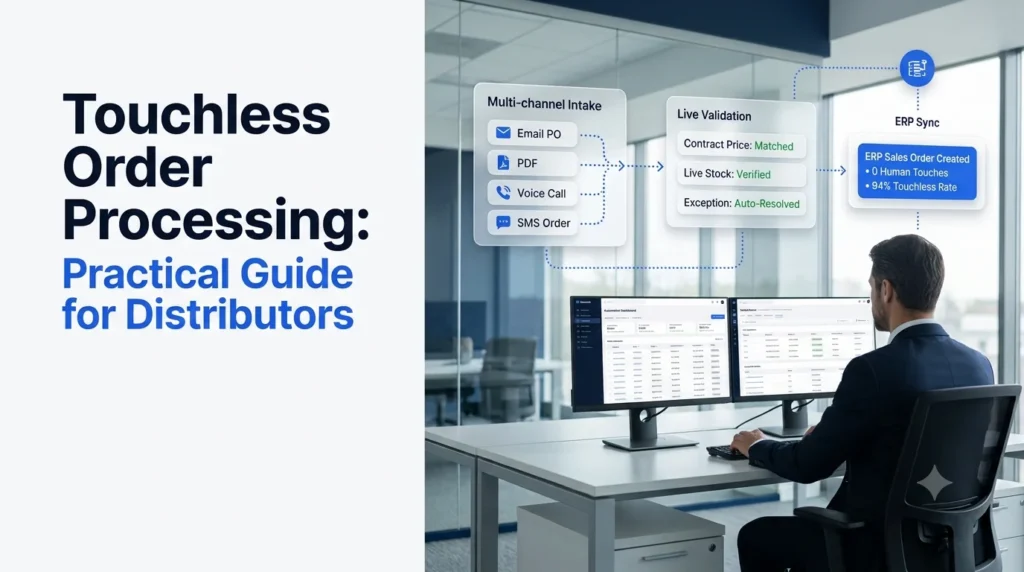
Key takeaways
- Touchless order processing means a customer order moves from email, PDF, phone or portal into your ERP with no person keying, checking or correcting it.
- In APQC research, top performers handle 94% of orders with no human intervention, while bottom performers need a person on 20% or more of orders.
- Four causes drive most manual touches: invoicing, pricing, contract and customer master data issues. Clean that data before you buy software.
- OCR and templates only read documents. A high touchless rate also needs validation, exception resolution and an ERP write-back.
- Track your touchless rate by channel and by exception reason, not as one blended number.
Touchless order processing is the point where your order desk stops retyping what customers already wrote down. For most distributors, that point is still some distance away: Conexiom data cited by Workd shows that seventy percent of B2B sales orders were still processed manually in 2025.
The daily routine is familiar. A rep opens the email, reads the PDF, looks up the customer’s part number, checks the contract price, keys each line into the ERP and sends a confirmation. Then repeats it a few hundred times.
This guide covers what a touchless order is, which data and system gaps block it, a 90-day rollout plan, and the KPIs that show whether it is working. It is written for operations, customer service and IT leaders at wholesale distributors who know the manual process well and want a plan to remove it.
What Is Touchless Order Processing?
In one line: no human enters, reviews or fixes the order between receipt and ERP confirmation.
In plain terms, touchless order processing (also called no-touch or straight-through order processing) means an order arrives, gets read, is validated against your catalog, pricing and inventory, and is written into the ERP as a sales order with a confirmation sent back, all without a person handling it. People still step in, but only for true exceptions that need judgment.
What Counts as a Touchless Order
An order is only touchless if nobody:
- keyed or re-keyed any line
- corrected a field such as unit of measure, ship-to or price
- approved it manually before release
- called or emailed the customer to clarify it
If a rep changed one unit of measure, the order was touched. Being strict here keeps your metric honest.
How to Calculate Your Touchless Rate
Touchless rate = (orders closed with zero human touches ÷ total orders received) × 100
Use total orders received, not total orders that went through your automation tool. Otherwise channels you have not automated yet, such as phone orders, disappear from the denominator and the number looks better than reality.
Example: you receive 1,000 orders in a week and 620 close with no touches. Your touchless rate is 62%.
Why Touchless Orders Matter for Distributors
In one line: manual entry costs labor, delays confirmations and creates errors customers notice.
Touchless order processing pays off in four places:
- Cost. APQC found that organizations without order processing automation spend $1.64 per $1,000 of revenue on sales order management, against $1.11 for those with automated ordering. For a company with $2 billion in revenue, APQC puts that gap at more than $1 million a year.
- Accuracy. Research from B2B commerce platform Zoey, cited by Workd, puts manual order accuracy at 95% to 98%. At 15,000 orders a year, 97% accuracy still means 450 orders with a mistake in them.
- Speed. Every manual queue adds hours. An order emailed at 4:45 pm often waits until the next morning to be entered and confirmed.
- Customer habits. A 2016 Modern Distribution Management study found 74% of customers prefer to email their purchase orders. A new portal alone will not move that behavior.
The goal is not to push every customer onto a portal. The goal is to make email, PDF, phone and portal orders all close the same way: without a rep retyping them.
If you want the full picture of where manual keying goes wrong, see our guide on how to reduce manual order entry errors in wholesale.
Touchless Order Workflow: Five Stages From Inbox to ERP
In one line: each stage removes one type of human touch, and skipping a stage caps your touchless rate.
Stage 1: Capture Every Channel
Orders arrive as email bodies, PDF attachments, faxes, EDI, portal submissions, phone calls and text messages. If 20% of your volume comes by phone and phone stays manual, your touchless rate can never pass 80%. Plan for multi-channel order capture from day one, even if you switch channels on one at a time.
Stage 2: Read and Extract the Order
The system pulls customer, ship-to, PO number, line items, quantities, units of measure and requested date. Real orders are messy: customers use their own part numbers, handwritten notes and shorthand like “2 cs of the usual.” Template-based OCR breaks when a customer changes their PO layout, which is why it is worth understanding the difference between AI order processing and OCR before you choose a tool. For PDF-heavy desks, our walkthrough of automated PDF order capture into your ERP goes deeper.
Stage 3: Validate Against Live Data
Extraction is not enough. Each line has to be checked against your live records:
- customer item number mapped to your SKU
- price matched to the customer’s contract
- stock available at the right branch
- credit status, minimum order quantity and ship-to address
This is where automated order validation catches the errors a tired rep would miss at 5 pm.
Stage 4: Resolve Exceptions Without a Rep
Most touchless order processing projects stall here. An item is out of stock, a price does not match, or a part number is unknown, and the order drops into a queue for a person. A touchless approach proposes the fix (a substitute, a partial shipment, a backorder), sends it to the customer through the channel they used, and records their sign-off. People only see edge cases that need real judgment.
Stage 5: Write to the ERP and Confirm
The validated order is created as a sales order through an ERP connector or API, the customer gets a confirmation that lists any changes, and every step is logged for audit. Our guide to ERP order processing covers the integration patterns in more detail.
Want to see all five stages run on your own orders? Book a demo with Ordana and bring a week of real POs.
Touchless Order Readiness: Fix These Data Gaps First
In one line: software cannot remove touches that bad data creates.
APQC broke down why sales orders need manual intervention. Invoicing issues caused 25% of interventions, pricing issues 20%, contract issues 18% and incorrect customer master data 15%. None of those are reading problems. They are data problems, and touchless order processing cannot work around them.
Before go-live, work through this checklist:
- Customer master data. One clean record per ship-to, with correct bill-to, terms and tax settings.
- Customer item cross-references. Map customer part numbers to your SKUs. Start with your top 50 customers by order count.
- Pricing and contracts. Contract prices live in the ERP, not in spreadsheets or a rep’s memory.
- Inventory visibility. Available-to-promise figures update in real time. If the system cannot confirm stock, it cannot release the order.
- Unit of measure rules. Case, pack and each conversions are defined for every SKU customers order.
- Written exception rules. Document what a rep does today when an item is out of stock or a price is disputed. Those rules become the automation’s playbook.
Touchless Order Processing Options Compared
In one line: four approaches exist, and only one resolves exceptions without a person.
| Criteria | Manual entry | Templates and OCR | Intelligent document processing (IDP) | AI order agents |
|---|---|---|---|---|
| How orders are read | Rep reads and types | Fixed templates per layout | Machine learning extraction | Language models trained on order data |
| New or changed PO layouts | Handled by rep | Breaks until template is rebuilt | Usually handled, may need retraining | Handled |
| Validation against catalog, price, stock | Rep checks manually | Limited or none | Partial, often rule add-ons | Built in, against live ERP data |
| Exception resolution | Rep calls or emails customer | Sent to a queue | Sent to a queue | Agent proposes fix and gets customer sign-off |
| Channels covered | All, slowly | Email and PDF | Email, PDF, scans | Email, PDF, fax, EDI, portal, phone, SMS |
| Where people still touch the order | Every order | Every exception and new layout | Every exception | Edge cases only |
| Best fit | Very low volume | Few customers, stable layouts | Document-heavy desks with staff for exceptions | Desks aiming for a high touchless rate across channels |
If you are weighing IDP specifically, read our breakdown of an alternative to intelligent document processing for order entry.
Touchless Order Processing Rollout: A 90-Day Plan
In one line: baseline, pilot in shadow mode, then release automatically and add channels.
Days 1 to 30: Baseline
- Count orders by channel and by customer for four weeks.
- Log every touch and tag its reason (unknown item, price mismatch, stock, ship-to, other).
- Calculate your current touchless rate and cost per order.
- Pick a starting scope: usually email and PDF orders from your top 20 customers.
Days 31 to 60: Pilot in Shadow Mode
- The system processes each order while a rep reviews the result before release.
- Compare outputs line by line and fix cross-references, UOM rules and pricing gaps as they surface.
- Switch order types to automatic release once their accuracy meets your target.
Days 61 to 90: Release and Expand
- Turn on automatic release for proven order types.
- Add phone, SMS and portal exceptions.
- Let the system contact customers to resolve routine exceptions.
- Review the top five exception reasons every week and fix the root cause in your data.
Keep people on new account setup, credit decisions, unusually large orders and disputes. For more on fitting an agent into your current team and systems, see how an AI agent integrates with your order desk.
Touchless Rate and the KPIs That Prove It Works
In one line: measure by channel and by exception reason so you know what to fix next.
| KPI | Definition | Why it matters |
|---|---|---|
| Touchless rate | Orders closed with zero touches ÷ orders received | The headline measure of progress |
| Touchless rate by channel | Same, split by email, PDF, phone, EDI, portal | Shows which channel is holding you back |
| Exception rate by reason | Share of orders flagged, grouped by cause | Points to the data fix with the biggest payoff |
| Order-to-confirmation time | Minutes from receipt to customer confirmation | What customers actually feel |
| Order error rate | Orders later credited, returned or re-shipped due to entry errors | Confirms accuracy, not just speed |
| Cost per order | Order desk labor and system cost ÷ orders processed | Ties the program to margin |
| Rep hours on entry | Weekly hours spent keying or fixing orders | Shows capacity freed for customers and selling |
APQC’s top performers sit at 94% touchless. Set your own touchless order processing targets by channel: clean EDI orders should get there sooner than phone orders. To put a number on the labor side, see our analysis of B2B order desk labor cost reduction.
How Ordana Delivers Touchless Order Processing
In one line: Ordana runs the order desk with AI agents that cover intake, validation, exceptions and ERP close on every channel.
Ordana builds AI agents for wholesale order desks. Instead of only reading documents, the agents carry each order through all five stages above, so your team stops handling routine orders and only sees the cases that need judgment.
| Workflow stage | Ordana agent | What it does |
|---|---|---|
| Capture and read written orders | Desk Agent | Picks up email, PDF, fax, EDI and portal orders as they arrive and reads them in any format |
| Capture phone orders | Voice Agent | Answers every inbound order call, captures the order during the call and pushes it to the ERP when the call ends |
| Capture text and chat orders | Chat Agent | Takes orders over SMS, WhatsApp and portal chat in plain language |
| Validate | Desk Agent | Checks every line against live catalog, pricing and inventory, and flags substitutions, short stock and price mismatches |
| Resolve exceptions | Desk Agent with Voice Agent | Contacts the retailer on their preferred channel, proposes a fix and gets sign-off; hands off to Voice Agent when a call is faster |
| Write to ERP and confirm | Desk Agent | Writes the order to the ERP, sends the confirmation and logs every action on a dashboard |
| Grow order value | Predict Agent | Builds each retailer’s likely cart from order history and flags items they usually order but left off |
A few details matter for distributors evaluating the approach:
- No change for your customers. Retailers keep ordering the way they do today, so you do not need a portal adoption campaign before you see results.
- ERP connectors. Ordana lists pre-built connectors for NetSuite, JD Edwards, SAP, Sage, Microsoft Dynamics, BigCommerce and Shopify, and says connectors go live in days.
- People stay in control. Edge cases escalate to your team, and every action and decision is logged for audit.
- Ordana’s published figures. Ordana reports up to 80% reduction in order processing labor, a 95% decrease in order entry errors and 4x more orders per agent without added headcount. Ask to see results from distributors with a channel mix close to yours.
Taken together, this is what Ordana calls zero-rep order entry: routine orders close on their own, and your team spends its time on accounts, exceptions and growth.
Ready to measure your own touchless rate? Book a demo with Ordana and we will run a sample of your real orders through Desk Agent.
Frequently Asked Questions (FAQ’s)
What is touchless order processing?
It is order handling where a customer order is captured, read, validated and written into the ERP as a sales order with no person entering, reviewing or correcting it. People only handle true exceptions.
What is a good touchless order rate for a distributor?
APQC research shows top performers process 94% of orders with no human intervention, while bottom performers need a person on 20% or more. Set targets by channel, since EDI orders usually reach a high rate sooner than phone or email orders.
Is a touchless order the same as an EDI order?
No. EDI is a structured feed from customers able to send one. Touchless orders can come from any channel, including email, PDF and phone, and an EDI order still counts as touched if a rep fixes an exception on it.
Do my customers need to change how they order?
Not with AI order agents. They read orders in the format customers already use, whether that is an email, a PDF, a phone call or a text.
How long does implementation take?
It depends mostly on data readiness. A 90-day phased plan (baseline, shadow-mode pilot, then automatic release) is a practical frame for a mid-sized distributor. Ordana says the first automated order typically goes through within 24 hours of go-live.
What happens when an order cannot be processed automatically?
It becomes an exception. AI agents resolve routine exceptions such as out-of-stock items or price mismatches by proposing a fix and getting customer sign-off. Cases that need judgment, such as credit decisions or disputes, go to your team with the full context attached.
Does automation replace the customer service team?
No. It removes the keying and checking, so your team can spend its time on new accounts, complex orders, customer relationships and growing order value.
Touchless Order Processing: Your Next Step
Pick one week of orders, count how many closed with no touches, and tag the reason behind every touch. That baseline tells you which channel and which data gap to fix first. When you are ready to see what the remaining manual work looks like with AI agents handling it, talk to Ordana.
← Back to all blogs