Key takeaways
- For a distributor, the purchase orders process starts when a customer’s PO lands in an inbox, a fax tray, an EDI feed or a phone line, and ends when a confirmed sales order sits in the ERP.
- The process has seven steps: receive, identify, read, validate, resolve exceptions, enter into the ERP and acknowledge. Most delays and errors happen in validation and exceptions, not typing.
- Published estimates for manual PO entry range from about 6 minutes to 20 minutes per order. Time a week of your own orders before you trust any benchmark.
- Most customers still send POs by email, so a portal alone will not fix the workload.
- OCR and templates speed up reading. Removing the manual work also needs live validation, exception handling and an ERP write-back.
The purchase orders process is how a distributor turns a customer’s purchase order into a confirmed sales order in its ERP. On paper it sounds simple: a PO arrives, someone keys it in, the warehouse ships. In practice, POs come in a dozen formats, use the customer’s own part numbers, quote last quarter’s prices and ask for stock that sits in the wrong branch.
That gap between the simple version and the real one is where order desks lose hours every day. Research from Distribution Strategy Group found that entering emailed orders into an ERP can take up 20% to 40% of the time of several customer service reps.
This guide walks through the full purchase orders process from the distributor’s side: how POs arrive, each step from inbox to ERP, where the process breaks, how the main entry methods compare, and a checklist to tighten it. It is written for operations, customer service and inside sales leaders at wholesale distributors.
What Is the Purchase Orders Process for a Distributor?
In one line: it is the work of receiving a customer’s PO, checking it and creating a matching sales order in your ERP.
In plain terms, a purchase order (PO) is the buying document your customer creates in their own system. It tells you what they want, how many, at what price, where to ship it and by when. Your purchase orders process takes that document and turns it into a sales order in your ERP, which is the record your warehouse, billing and credit teams work from. If you want the background on that second record, see our guide to digital sales orders.
This guide covers inbound POs from customers. Distributors also send POs to their own suppliers, but that is a procurement workflow with different steps.
What a Customer Purchase Order Contains
A typical PO includes:
- PO number and date, which your customer uses to match your invoice later
- Bill-to and ship-to details, sometimes for several delivery locations
- Line items with the customer’s part number, description, quantity and unit of measure
- Prices the customer expects to pay, often taken from an old quote or contract
- Requested delivery date and shipping instructions
- Terms and notes, such as “partial shipments OK” or “call before delivery”
Purchase Order vs Sales Order
| Purchase order (PO) | Sales order | |
|---|---|---|
| Who creates it | Your customer | Your team or your system |
| Where it lives | Customer’s ERP or procurement tool | Your ERP |
| Item numbers used | Customer part numbers | Your SKUs |
| Purpose | Authorizes the purchase | Drives picking, shipping and invoicing |
| EDI document | 850 | Confirmed back with an 855 acknowledgment |
The whole purchase orders process exists to translate the left column into the right column without losing accuracy on the way.
Purchase Orders Process Step by Step: From Inbox to ERP
In one line: seven steps move a PO from receipt to a confirmed sales order, and each one is a chance for delay.
Step 1: Receive the PO
POs arrive through email bodies, PDF attachments, Excel files, fax, EDI, portals, phone calls, text messages and sales reps in the field. A 2016 study by Modern Distribution Management with Distribution Strategy Group found that about 74% of end users order by email frequently or very frequently, either in the email body or as a PDF, Word or Excel attachment.
Step 2: Identify the Customer and Log the PO
Someone has to match the sender to the right customer account and ship-to, then check the PO number against open orders. This step catches duplicates, such as a PO sent by email and then again by fax, and revised POs that replace an earlier version.
Step 3: Read and Interpret Each Line
The rep reads every line and works out what the customer means. Customers write “2 cs blue nitrile L” or use their internal item code, so the rep looks up the matching SKU. PDFs are the most common source of retyping, which is why many distributors start with automated PDF order capture into the ERP.
Step 4: Validate Against Your Live Data
Each line gets checked against:
- the customer item cross-reference
- the customer’s contract or price list
- available stock at the shipping branch
- unit of measure and minimum order quantity
- credit limit and account status
Skipping this step is how wrong prices and wrong items reach the warehouse. Our guide to automated order validation for wholesale covers which checks matter most.
Step 5: Resolve Exceptions
When a check fails, the PO stops. A rep emails or calls the customer about a price mismatch, an out-of-stock item, an unknown part number or a missing ship-to, then waits for an answer. This is the slowest step in most purchase orders process workflows, because it depends on someone replying.
Step 6: Enter the Sales Order in the ERP
The rep keys the header and every line into the ERP, or imports them if the order came through EDI. Our guide to ERP order processing explains the common integration patterns.
Step 7: Send the Order Acknowledgment
The customer gets a confirmation with your order number, confirmed prices, quantities and ship dates, plus any changes from their original PO. From here, the order moves into fulfillment and your team starts to manage sales orders through shipping and invoicing.
The purchase orders process is not a typing problem. Typing is one step out of seven. The time goes into reading, checking and chasing answers.
Purchase Order Channels: How POs Reach a Distributor
In one line: every channel brings its own format and its own errors, and most distributors run all of them at once.
| Channel | What arrives | How it is usually handled | Typical problems |
|---|---|---|---|
| Email body | Free text order lines | Rep reads and keys | Shorthand, missing PO number |
| PDF attachment | Customer’s PO printed from their ERP | Rep reads and keys, or OCR | Layout changes, multi-page POs, several POs in one email |
| Excel or CSV | Spreadsheet of lines | Copy and paste or import | Inconsistent columns and units |
| Fax | Scanned image | Rep reads and keys | Poor image quality, handwriting |
| EDI (850) | Structured data | Automatic import | Mapping errors, exceptions still need a rep |
| Portal or ecommerce | Structured order | Automatic import | Low adoption, duplicate orders sent by email too |
| Phone | Spoken order | Rep types during or after the call | Missed calls, mishearing, no written record |
| SMS or WhatsApp | Short text or photo | Rep reads and keys | No structure, photos of shelves or notes |
Most of these channels still end with someone keying the order. Conexiom data cited by Workd shows that 70% of B2B sales orders were processed manually in 2025. Handling all of these in one queue is the idea behind multi-channel order capture automation.
Purchase Orders Process Problems: Where Time and Accuracy Go
In one line: manual entry is slow, and the errors it creates cost more than the entry itself.
How Long Manual PO Entry Takes
Published figures vary widely:
- About 6 minutes per order, according to Workd’s estimate for a typical mid-market distributor using phone, email, fax and manual ERP entry.
- 8 to 12 minutes per order for the end-to-end manual purchase order process, according to suppliers interviewed by Hobson & Company in ROI research cited by TradeCentric.
- About 20 minutes and $10 to $12 per order, according to WizCommerce’s industry baseline.
The spread comes from line counts, how many exceptions each PO has and whether the estimate includes chasing customers. Time 50 of your own POs from receipt to acknowledgment to get a real number. Our breakdown of B2B order desk labor cost reduction shows how to turn that number into a cost.
Where Errors Come From
Conexiom, citing APQC benchmarks, puts the average error rate for manual order entry at 1% to 3%. At 2,000 POs a month, a 2% rate means about 40 orders with a mistake in them, each one a potential credit, return or reshipment.
APQC also broke down why sales orders need manual intervention: invoicing issues caused 25% of interventions, pricing issues 20%, contract issues 18% and incorrect customer master data 15%. Most of these are data problems, not reading problems.
Common error sources in the purchase orders process include:
- Customer part numbers that do not map to a SKU
- Unit of measure confusion, such as cases versus eaches
- Outdated prices copied from an old quote
- Several POs in one email, where one gets missed
- Revised POs that get entered twice instead of replacing the original
- Ship-to errors when a customer has many locations
For a deeper look at fixing these, read how to reduce manual order entry errors in wholesale and our overview of order management challenges in wholesale.
Want to see what your own POs look like without manual entry? Book a demo with Ordana and bring a week of real customer orders.
Purchase Orders Process Options Compared: Manual, OCR, EDI and AI Agents
In one line: each method speeds up a different step, and only one covers exceptions and every channel.
| Criteria | Manual entry | Templates and OCR | EDI | AI order agents |
|---|---|---|---|---|
| Channels covered | All, slowly | Email and PDF | Only customers with EDI | Email, PDF, fax, EDI, portal, phone, SMS |
| New or changed PO layouts | Rep adapts | Breaks until template is rebuilt | Not applicable | Handled |
| Customer part numbers | Rep looks up | Needs mapping tables | Needs mapping tables | Matched from order history and catalog |
| Validation against price, stock, credit | Rep checks | Limited | Rules in ERP | Built in, against live ERP data |
| Exception handling | Rep emails or calls | Sent to a queue | Sent to a queue | Agent contacts customer, proposes fix, gets sign-off |
| Customer effort to adopt | None | None | High (setup per customer) | None |
| Best fit | Very low volume | Few customers, stable layouts | Large customers with EDI capability | Mixed channels and high volume |
OCR reads characters. It does not know that “blue nitrile L” means a specific SKU or that a price is out of contract. That difference is covered in our comparison of AI order processing vs OCR. If you are also looking at document capture tools, see this alternative to intelligent document processing for order entry, and for a broader buyer view, our guide to order processing software.
Purchase Orders Process Checklist: Six Fixes for Faster PO Entry
In one line: measure first, clean the data, then automate the steps that cost the most.
- Map every channel. Count POs by channel and by customer for four weeks. You cannot plan automation for volume you have not counted.
- Time the full process. Measure from receipt to acknowledgment, not just keying time, and tag each delay by cause.
- Build customer item cross-references. Map customer part numbers to your SKUs, starting with your top 50 customers by PO count.
- Put contract prices in the ERP. Prices kept in spreadsheets or in a rep’s head are a common source of pricing exceptions.
- Write down your exception rules. Record what a rep does today for out-of-stock items, price disputes and unknown parts. Those rules become the instructions for any automation.
- Set an acknowledgment target. Pick a time, such as same business day, and track how often you hit it.
Purchase Order Process KPIs to Track
| KPI | Definition | Why it matters |
|---|---|---|
| PO-to-acknowledgment time | Minutes from receipt to confirmation sent | What your customer actually feels |
| Entry time per PO | Rep minutes spent per order | Shows labor cost and capacity |
| Exception rate by reason | Share of POs that stop, grouped by cause | Points to the data fix with the biggest payoff |
| Order error rate | Orders credited, returned or reshipped due to entry mistakes | Confirms accuracy, not just speed |
| Share of POs entered without manual work | POs closed with no rep touch ÷ POs received | Tracks progress toward full automation |
Purchase Orders Process Automation With Ordana
In one line: Ordana’s AI agents handle each step from receipt to ERP confirmation, on every channel your customers already use.
Ordana builds AI agents for wholesale order desks. Instead of only reading POs, the agents carry each one through the full purchase orders process, so your team only steps in for cases that need judgment.
| Purchase order step | Ordana agent | What it does |
|---|---|---|
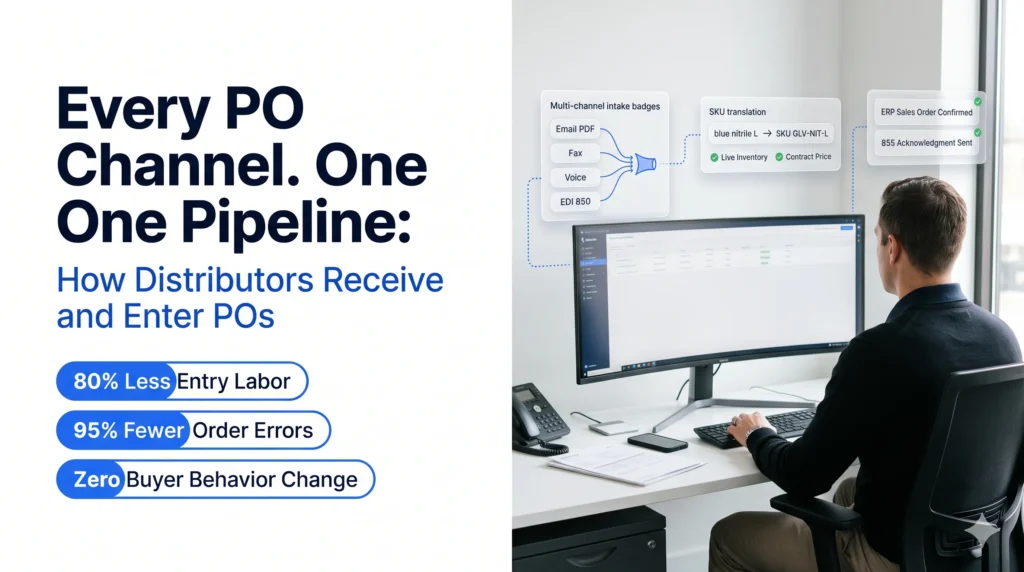
| Receive written POs | Desk Agent | Picks up POs from email, fax, PDF, SMS, EDI or web portal and reads them in any format |
| Receive phone orders | Voice Agent | Answers inbound order calls around the clock, trained on your catalog |
| Receive text and chat orders | Chat Agent | Takes orders over SMS or chat on your portal, interprets intent and confirms them |
| Read and validate | Desk Agent | Cross-checks every line against live catalog, pricing and inventory, and flags substitutions, short stock and price mismatches |
| Resolve exceptions | Desk Agent with Voice Agent | Contacts the customer on their preferred channel, proposes a fix and gets sign-off; uses Voice Agent when a call is faster |
| Enter into ERP and acknowledge | Desk Agent | Closes the order into the ERP and confirms it with the customer |
| Grow order value | Predict Agent | Pre-builds each customer’s likely cart from order history |
What this means for a distributor evaluating the approach:
- No change for your customers. They keep sending POs the way they do today, so you do not need a portal adoption campaign first.
- ERP connectors. Ordana lists pre-built connectors for NetSuite, JD Edwards, SAP, Sage, Microsoft Dynamics, BigCommerce and Shopify, and says they go live in days.
- Your team stays in control. Edge cases go to a person with the full context attached. For how this fits alongside your current staff, see how an AI agent integrates with your order desk.
- Ordana’s published figures. Ordana reports up to 80% reduction in order processing labor, a 95% decrease in order entry errors, 4x more orders per agent without adding headcount, and a first automated order typically within 24 hours of go-live. Ask for results from distributors with a channel mix close to yours.
The end state is what Ordana calls zero-rep order entry: routine POs close on their own, and your reps spend their time on customers instead of keyboards.
Ready to take manual work out of your PO intake?
Frequently Asked Questions (FAQ’s)
What are the steps in the purchase orders process for a distributor?
Seven steps: receive the PO, identify the customer and log it, read each line, validate against pricing, stock and credit, resolve exceptions, enter the sales order into the ERP, and send an order acknowledgment.
What is the difference between a purchase order and a sales order?
The customer creates the purchase order in their own system to authorize a purchase. The distributor creates a sales order in its ERP to fulfil it. The sales order uses the distributor’s SKUs and drives picking, shipping and invoicing.
How long does it take to enter a purchase order manually?
Published estimates range from about 6 minutes (Workd) to 8 to 12 minutes (Hobson & Company supplier interviews) and up to 20 minutes (WizCommerce). Line count and exceptions drive most of the difference, so time your own orders.
Why do customers still send POs by email instead of using a portal?
Many customers create POs in their own ERP and email them straight out of that system. Entering the same order again on a supplier portal is extra work for them, which is why email ordering has stayed common.
Can OCR automate the purchase order process?
Partly. OCR speeds up reading PDFs and scans, but it does not validate prices or stock, map customer part numbers or resolve exceptions. Those steps still need a rep unless you add validation and exception handling.
What is an order acknowledgment?
It is the confirmation a distributor sends after entering the sales order. It lists the order number, confirmed items, prices, quantities and ship dates, and flags any changes from the original PO. In EDI it is the 855 document.
Do customers have to change how they send POs to use AI order agents?
No. AI order agents read POs in the formats customers already use, including email, PDF, fax, EDI, phone and text.
Purchase Orders Process: Your Next Step
Pull last week’s POs, note the channel each came through, and time how long each took to reach acknowledgment. Tag every delay by reason. That list shows which step of your purchase orders process to fix first. When you want to see those same orders processed without manual entry, talk to Ordana.
← Back to all blogs